mirror of
https://github.com/github/awesome-copilot.git
synced 2026-03-13 20:55:13 +00:00
 a4938e2aa7
* Add napkin plugin: visual whiteboard collaboration for Copilot CLI

Napkin opens an interactive HTML whiteboard in the user's browser where
they can draw, sketch, and add sticky notes. When ready, they click
'Share with Copilot' which exports a PNG snapshot. The Copilot CLI agent
reads the PNG via the view tool, and the multimodal AI model interprets
the drawings, spatial layout, and text content — responding
conversationally as a collaborator.

Built for non-technical users: lawyers, PMs, business stakeholders,
designers, and anyone who thinks better visually.

Includes:
- Self-contained HTML whiteboard (zero external dependencies)
- Shape recognition (wobbly shapes snap to clean versions)
- Freehand drawing, sticky notes, arrows, text labels
- Auto-save to localStorage
- SKILL.md with agent instructions
- SVG visual guides for step-by-step README documentation
- Plugin manifest for Copilot CLI installation

Co-authored-by: Copilot <223556219+Copilot@users.noreply.github.com>

* Fix review feedback: roundRect compat, cross-platform shortcuts, eraser undo

- Add safeRoundRect() fallback for browsers without CanvasRenderingContext2D.roundRect()
- Update undo/redo button titles to show Ctrl/Cmd instead of Mac-only Cmd
- Fix eraser undo by capturing state before first erase mutation per gesture

Co-authored-by: Copilot <223556219+Copilot@users.noreply.github.com>

* Update skills/napkin/templates/napkin.html

Co-authored-by: Copilot <175728472+Copilot@users.noreply.github.com>

* Update plugins/napkin/README.md

Co-authored-by: Copilot <175728472+Copilot@users.noreply.github.com>

* Update skills/napkin/templates/napkin.html

Co-authored-by: Copilot <175728472+Copilot@users.noreply.github.com>

* Update skills/napkin/templates/napkin.html

Co-authored-by: Copilot <175728472+Copilot@users.noreply.github.com>

* Update skills/napkin/templates/napkin.html

Co-authored-by: Copilot <175728472+Copilot@users.noreply.github.com>

* Add missing Line (L) and Eraser (E) keyboard shortcuts to README

The in-app shortcuts panel and keyMap handler both support L for Line
and E for Eraser, but the README keyboard shortcuts table was missing
both entries. Adds them to match the actual implementation.

Co-authored-by: Copilot <223556219+Copilot@users.noreply.github.com>

* Combine docs/ and templates/ into assets/ per agentskills.io spec

Moves skills/napkin/docs/*.svg and skills/napkin/templates/napkin.html
into skills/napkin/assets/ to align with the Agent Skills specification.
Updates all path references in SKILL.md, README.md, and generated docs.

Addresses review feedback from PR #929.

Co-authored-by: Copilot <223556219+Copilot@users.noreply.github.com>

---------

Co-authored-by: Dan Velton <dvelton@Dans-MacBook-Pro.local>
Co-authored-by: Copilot <223556219+Copilot@users.noreply.github.com>
Co-authored-by: Copilot <175728472+Copilot@users.noreply.github.com>
98 lines
6.6 KiB
XML
98 lines
6.6 KiB
XML
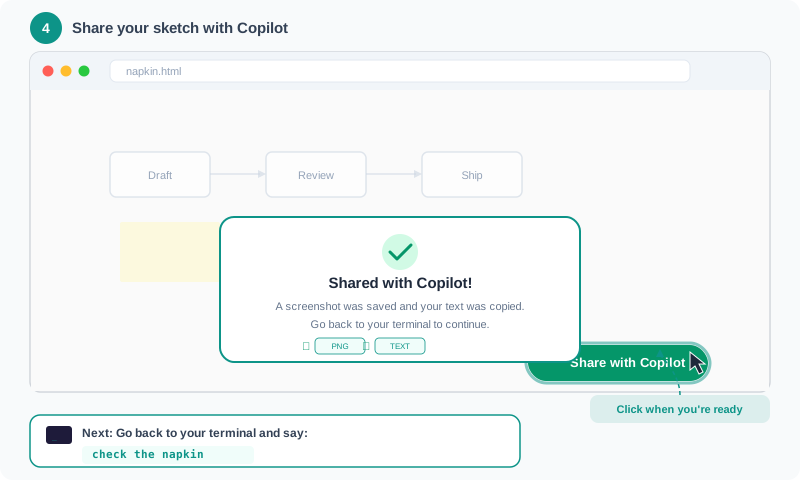


<svg xmlns="http://www.w3.org/2000/svg" width="800" height="480" viewBox="0 0 800 480">
|
|
<defs>
|
|
<linearGradient id="popupShadow" x1="0" y1="0" x2="0" y2="1">
|
|
<stop offset="0%" stop-color="#0D9488" stop-opacity="0.08"/>
|
|
<stop offset="100%" stop-color="#0D9488" stop-opacity="0.02"/>
|
|
</linearGradient>
|
|
</defs>
|
|
|
|
<!-- Background -->
|
|
<rect width="800" height="480" rx="12" fill="#F8FAFB"/>
|
|
|
|
<!-- Step indicator -->
|
|
<circle cx="46" cy="28" r="16" fill="#0D9488"/>
|
|
<text x="46" y="33" text-anchor="middle" font-family="Arial, Helvetica, sans-serif" font-size="14" font-weight="bold" fill="white">4</text>
|
|
<text x="72" y="33" font-family="Arial, Helvetica, sans-serif" font-size="15" font-weight="bold" fill="#334155">Share your sketch with Copilot</text>
|
|
|
|
<!-- Browser Window -->
|
|
<g transform="translate(30, 52)">
|
|
<!-- Browser frame -->
|
|
<rect width="740" height="340" rx="10" fill="white" stroke="#D1D5DB" stroke-width="1.5"/>
|
|
<!-- Browser chrome -->
|
|
<rect width="740" height="38" rx="10" fill="#F1F5F9"/>
|
|
<rect x="0" y="28" width="740" height="10" fill="#F1F5F9"/>
|
|
<circle cx="18" cy="19" r="5.5" fill="#FF5F57"/>
|
|
<circle cx="36" cy="19" r="5.5" fill="#FFBD2E"/>
|
|
<circle cx="54" cy="19" r="5.5" fill="#28C840"/>
|
|
<rect x="80" y="8" width="580" height="22" rx="6" fill="white" stroke="#E2E8F0" stroke-width="1"/>
|
|
<text x="96" y="23" font-family="Arial, Helvetica, sans-serif" font-size="11" fill="#94A3B8">napkin.html</text>
|
|
|
|
<!-- Whiteboard canvas (slightly dimmed to show overlay context) -->
|
|
<rect x="1" y="38" width="738" height="301" fill="#FAFAFA"/>
|
|
|
|
<!-- Simplified whiteboard content (faded to focus on the popup) -->
|
|
<!-- Mini flowchart -->
|
|
<rect x="80" y="100" width="100" height="45" rx="6" fill="white" stroke="#CBD5E1" stroke-width="1.5" opacity="0.6"/>
|
|
<text x="130" y="127" text-anchor="middle" font-family="Arial, Helvetica, sans-serif" font-size="11" fill="#94A3B8">Draft</text>
|
|
<line x1="180" y1="122" x2="230" y2="122" stroke="#CBD5E1" stroke-width="1.5" opacity="0.6"/>
|
|
<polygon points="228,118 236,122 228,126" fill="#CBD5E1" opacity="0.6"/>
|
|
<rect x="236" y="100" width="100" height="45" rx="6" fill="white" stroke="#CBD5E1" stroke-width="1.5" opacity="0.6"/>
|
|
<text x="286" y="127" text-anchor="middle" font-family="Arial, Helvetica, sans-serif" font-size="11" fill="#94A3B8">Review</text>
|
|
<line x1="336" y1="122" x2="386" y2="122" stroke="#CBD5E1" stroke-width="1.5" opacity="0.6"/>
|
|
<polygon points="384,118 392,122 384,126" fill="#CBD5E1" opacity="0.6"/>
|
|
<rect x="392" y="100" width="100" height="45" rx="6" fill="white" stroke="#CBD5E1" stroke-width="1.5" opacity="0.6"/>
|
|
<text x="442" y="127" text-anchor="middle" font-family="Arial, Helvetica, sans-serif" font-size="11" fill="#94A3B8">Ship</text>
|
|
|
|
<!-- Mini sticky notes (faded) -->
|
|
<rect x="90" y="170" width="100" height="60" rx="2" fill="#FEF9C3" opacity="0.5"/>
|
|
<rect x="260" y="175" width="90" height="55" rx="2" fill="#FCE7F3" opacity="0.5"/>
|
|
<rect x="420" y="168" width="100" height="58" rx="2" fill="#DBEAFE" opacity="0.5"/>
|
|
|
|
<!-- Share with Copilot button — HIGHLIGHTED with glow -->
|
|
<rect x="498" y="293" width="180" height="36" rx="18" fill="#059669"/>
|
|
<rect x="496" y="291" width="184" height="40" rx="20" fill="none" stroke="#0D9488" stroke-width="3" opacity="0.5"/>
|
|
<text x="540" y="315" font-family="Arial, Helvetica, sans-serif" font-size="13" fill="white" font-weight="bold">Share with Copilot</text>
|
|
|
|
<!-- Click cursor icon near button -->
|
|
<g transform="translate(660, 300)">
|
|
<path d="M0,0 L0,18 L5,14 L9,22 L13,20 L9,12 L15,12 Z" fill="#1E293B" stroke="white" stroke-width="1"/>
|
|
</g>
|
|
|
|
<!-- Confirmation Popup -->
|
|
<rect x="190" y="165" width="360" height="145" rx="14" fill="white" stroke="#0D9488" stroke-width="2"/>
|
|
<!-- Green check circle -->
|
|
<circle cx="370" cy="200" r="18" fill="#D1FAE5"/>
|
|
<path d="M360,200 L367,207 L381,193" fill="none" stroke="#059669" stroke-width="3" stroke-linecap="round" stroke-linejoin="round"/>
|
|
<!-- Popup text -->
|
|
<text x="370" y="236" text-anchor="middle" font-family="Arial, Helvetica, sans-serif" font-size="15" font-weight="bold" fill="#1E293B">Shared with Copilot!</text>
|
|
<text x="370" y="258" text-anchor="middle" font-family="Arial, Helvetica, sans-serif" font-size="11" fill="#64748B">A screenshot was saved and your text was copied.</text>
|
|
<text x="370" y="276" text-anchor="middle" font-family="Arial, Helvetica, sans-serif" font-size="11" fill="#64748B">Go back to your terminal to continue.</text>
|
|
<!-- Tiny icons for PNG + text -->
|
|
<rect x="285" y="286" width="50" height="16" rx="4" fill="#F0FDFA" stroke="#0D9488" stroke-width="0.8"/>
|
|
<text x="310" y="297" text-anchor="middle" font-family="Arial, Helvetica, sans-serif" font-size="8" fill="#0D9488">PNG</text>
|
|
<rect x="345" y="286" width="50" height="16" rx="4" fill="#F0FDFA" stroke="#0D9488" stroke-width="0.8"/>
|
|
<text x="370" y="297" text-anchor="middle" font-family="Arial, Helvetica, sans-serif" font-size="8" fill="#0D9488">TEXT</text>
|
|
<!-- Check marks -->
|
|
<text x="272" y="298" font-family="Arial, Helvetica, sans-serif" font-size="11" fill="#059669">✓</text>
|
|
<text x="332" y="298" font-family="Arial, Helvetica, sans-serif" font-size="11" fill="#059669">✓</text>
|
|
</g>
|
|
|
|
<!-- Annotation Arrow 1: Pointing to Share button -->
|
|
<g transform="translate(0, 0)">
|
|
<rect x="590" y="395" width="180" height="28" rx="8" fill="#0D9488" opacity="0.12"/>
|
|
<text x="680" y="413" text-anchor="middle" font-family="Arial, Helvetica, sans-serif" font-size="11" fill="#0D9488" font-weight="bold">Click when you're ready</text>
|
|
<path d="M680,395 C680,380 670,365 660,355" fill="none" stroke="#0D9488" stroke-width="1.5" stroke-dasharray="4,3"/>
|
|
<polygon points="656,357 660,349 664,357" fill="#0D9488"/>
|
|
</g>
|
|
|
|
<!-- Annotation Arrow 2: Terminal instruction -->
|
|
<g transform="translate(0, 0)">
|
|
<rect x="30" y="415" width="490" height="52" rx="10" fill="white" stroke="#0D9488" stroke-width="1.5"/>
|
|
<!-- Terminal mini icon -->
|
|
<rect x="46" y="426" width="26" height="18" rx="3" fill="#1E1B3A"/>
|
|
<text x="52" y="439" font-family="monospace" font-size="8" fill="#0D9488">_</text>
|
|
<text x="82" y="437" font-family="Arial, Helvetica, sans-serif" font-size="12" fill="#334155" font-weight="bold">Next: Go back to your terminal and say:</text>
|
|
<rect x="82" y="446" width="172" height="18" rx="4" fill="#F0FDFA"/>
|
|
<text x="92" y="458" font-family="monospace" font-size="11" fill="#0D9488" font-weight="bold">check the napkin</text>
|
|
</g>
|
|
</svg> |